The free online form creator

A free online form builder with no sign-up and no response caps. Start typing below and share your form anywhere.

  • No sign-up to start
  • Unlimited responses

Loading the form builder

Your draft stays in this browser. To publish, confirm your email with a one-time code. Load a sample form instead

  • 22 question types
  • 8 ways to embed
  • 11 integrations
  • Unlimited responses on Free
  • Free to start, no card

Why PulseFormCreator

Everything a form needs. Nothing that slows you down.

Start without an account, collect as many answers as you like, and keep your data private.

Three ways to start

Type straight onto the canvas, let AI draft it from a description, or open one of 28 templates.

Three ways to start a survey in PulseFormCreator: type your own questions, describe the survey to AI, or pick a template.

Private by default

Answers stay between you and your respondents.

  • Responses store a one-way hash, never IP addresses.
  • Anonymous mode keeps no device or network details at all.
  • Published forms and surveys are unlisted and hidden from search engines.
  • No ad trackers unless you add them.
  • Export or delete your data any time.

How we keep data safe

Question types

Every kind of question, free on every plan.

22 question types and 8 layout blocks, from quick polls to long registration forms.

Ask each question the way it should be asked

Matrix grids, ranking, sliders, signatures and file uploads work as well on a phone as on a laptop.

  • Short answer
  • Long answer
  • Single choice
  • Multiple choice
  • Dropdown
  • Yes / No
  • Rating
  • NPS
  • Date
  • Email
  • Matrix / Likert
  • Ranking
  • Slider
  • File upload
  • Number
  • Phone number
  • Website link
  • Time
  • Signature
  • Consent checkbox
  • Picture choice
  • Address
  • Heading
  • Paragraph
  • Divider
  • Page break
  • Section break
  • Image
  • Video
  • Embed
Every question type: a wall of 30 block types and a phone cycling through NPS, matrix, ranking, slider, signature, address, file upload and picture choice questions.
  • Contact details. Names, emails, phones, links and addresses.
  • File uploads. Images, PDFs, audio and video. Free: 10 MB per file
  • Signatures. Drawn with a finger, pen or mouse.
  • Ratings and scales. Stars, NPS, sliders and ranking.
  • Dates, times and numbers. Validated as people answer.
  • Picture choice. Image options, plus an “Other” answer.

Nobody hits a paywall to fill in your form.

Responses are never capped or charged for. Read the fair use policy

Conversational layout

One question at a time, made for the phone in their hand.

Pick Conversational in the Design tab and each question gets its own screen. Prefer one page? Keep Classic.

  • A progress bar that follows each respondent’s actual path
  • Big, thumb-friendly answer buttons
  • Respondents can pick up where they left off
  • Works as a full page, an embed or a pop-up
The same post-event survey in the conversational layout (one question at a time) and the classic layout (all questions on one page), on a laptop and a phone.

Logic and scoring

Branching logic you can read at a glance.

Show, hide and skip questions, score quizzes and personalise every screen, without code.

See the whole flow

Rules sit under the question they run after. Open Flow to see every question, jump and ending on one map.

Flow map of a three-question beach safety quiz, with a jump to the tips page and three outcome screens chosen by score.

Quizzes that mark themselves

Mark the right answers. PulseFormCreator scores each response and shows the matching ending.

Scoring: the correct answer to a quiz question marked and given a point, then the ending screen “Between the flags, you scored 3 out of 3”.

Hidden fields and prefill

Pass names or sources in the link, then greet people by name or prefill answers.

A pre-fill link with the hidden fields name=Mia and utm_source=newsletter, and the survey greeting the respondent: G'day Mia.
  • Conditional questions. Show or hide blocks based on answers.
  • Answer piping. Type @ to reuse an earlier answer.
  • Calculated values. Running totals, prices or scores.
  • Endings and redirects. Different thank-you screens, or your own page.
  • Randomised order. Shuffle options or whole questions.
  • Access controls. Passwords, schedules and response limits.
  • Spam protection. Bot traps, time checks and duplicate blocking.
  • Email verification. Confirm respondents with a one-time code. Available on Business

Results

See who answered, who dropped off, and where.

Responses arrive as they happen, with a chart for every question.

Insights at a glance

Views, starts, completions, median time and sources, with a daily trend and a drop-off funnel.

Free: last 7 daysAvailable on Pro

Insights for a product feedback survey: 1,012 views, 624 starts, 480 submissions, a 77% completion rate and a median time of 2 minutes 22 seconds, with a 30-day trend and the drop-off by question — most people left at the features question.Example data

Partial responses

Keep answers from people who started but didn’t finish.

Available on Pro

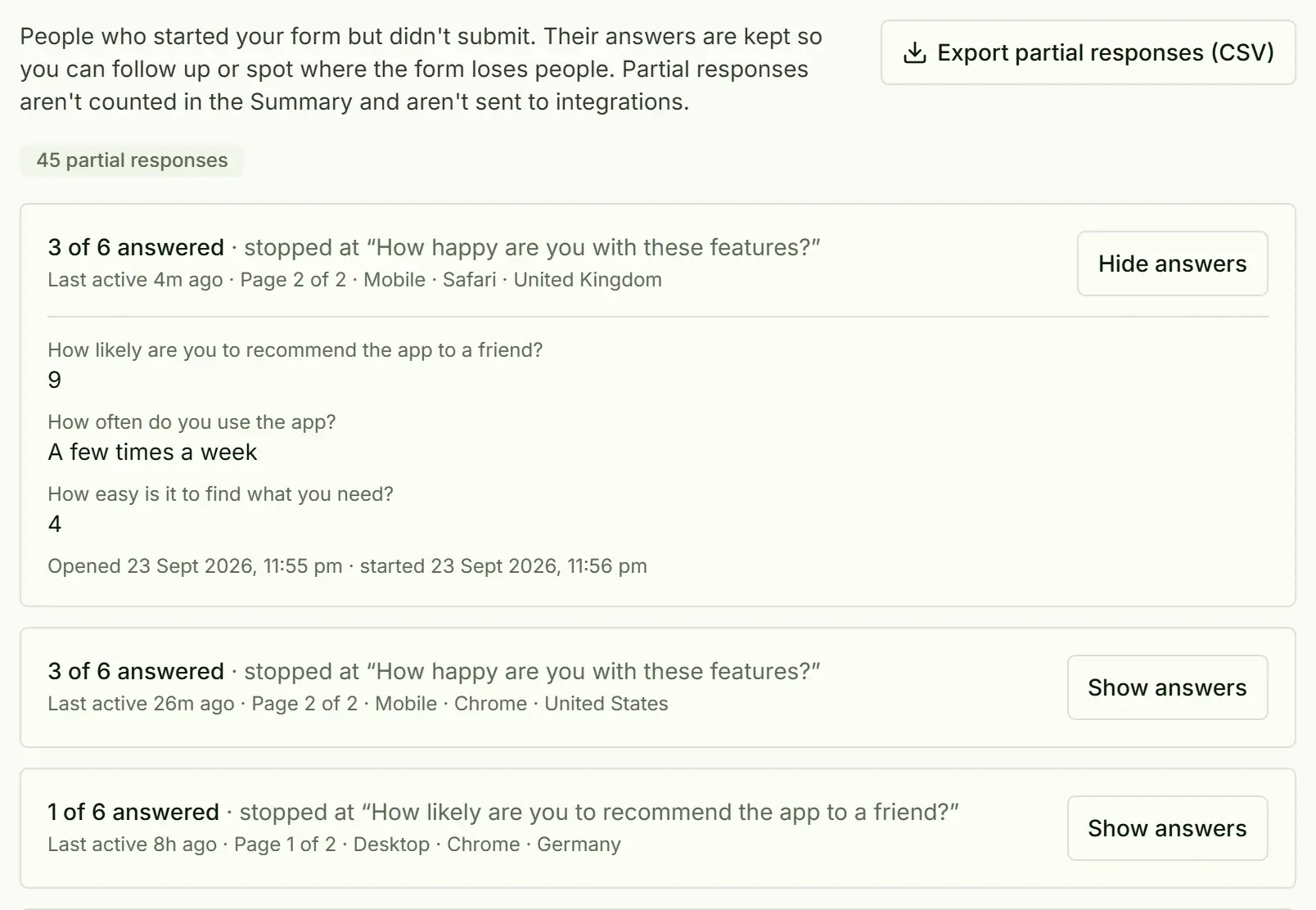
Partial responses: 45 people who started but didn't submit, each showing how many questions they answered, where they stopped, and their answers so far.
Example data

Summaries and exports

Per-question charts, a searchable response table and CSV or Excel downloads.

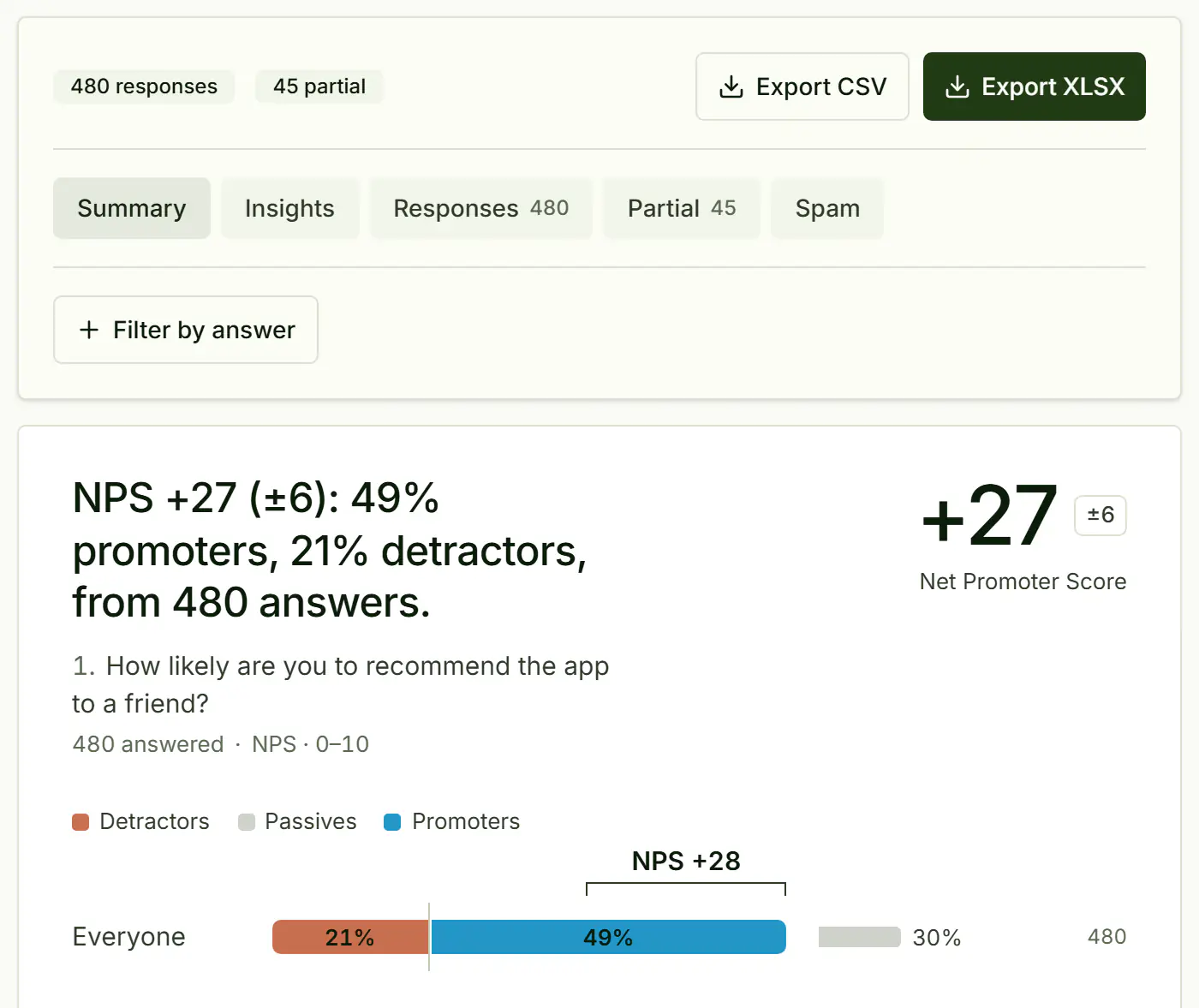
The results summary: 480 responses and 45 partial, Export CSV and Export XLSX buttons, and the recommend question's NPS of 29 with the promoter, passive and detractor split and a bar chart of every score.
Example data
  • NPS, worked out. Promoters, detractors and your score.
  • Search and filter. Search across every response.
  • Side panel. Open a response without losing your place.
  • CSV and Excel. Download everything, any time.
  • Traffic sources. See where respondents came from.
  • Delivery log. Check and resend integration deliveries.

Your data leaves with you, whenever you like.

CSV and Excel export come with every plan. Your data choices

Design

Surveys that look like your brand, not ours.

Pick a theme, add your logo and colours, and preview every change live.

A new look in one click

12 gradient themes, 8 style presets, and saved themes you can reuse.

The Design tab and a live preview of the same survey in four looks: the Friendly Warm font and colour preset, a teal brand colour with the Harbour Forum logo, a background image, and the Iris Violet gradient theme.
  • Colours and fonts. Fine-tune buttons, answers and corners.
  • Logo and background. Upload your logo and an image.
  • Rich content. Images, video and embeds between questions.
  • Link previews. Choose the title and image people see. Available on Pro
  • Custom CSS. Adjust any detail yourself. Available on Pro
  • No PulseFormCreator branding. Hide the “Made with PulseFormCreator” badge. Available on Pro

Share

Share it wherever your audience already is.

Send a link, print a QR code, or embed it on your site in 8 styles.

8 ways to embed

Inline, full page, pop-up, slider, popover, side tab, chat bubble or feedback button. Paste one snippet.

Inline: the survey sits in your page and grows to fit its questions.

A mock website showing where each of the 8 embed styles places the survey.

Links, QR codes and email

Every published survey gets a short link.

  • QR codes. Download as PNG or SVG.

  • Email button. Drop a button into your newsletter.

  • Prefill links. Links that fill in answers for people.

Sharing a survey: its short link www.pulseformcreator.com/s/livedemo with a copy button, a QR code you can download as PNG or SVG, an email button for newsletters, and a pre-fill link that fills in the name Mia and the source "newsletter".

Integrations

Send each response straight to the tools you use.

11 integrations, set up in a few clicks. Zapier, Make and n8n reach thousands more apps.

  • Google Sheets

    A new row for every response.

  • Notion

    A database page per response.

  • Airtable

    A table record per response.

  • Slack

    Post responses to a channel.

  • Discord

    Share responses in your server.

  • Webhooks

    Signed JSON to any URL.

  • Zapier

    Start a Zap from a Catch Hook.

  • Make

    Trigger a scenario.

  • n8n

    Run a workflow.

  • Email me

    An email for each response.

  • Email the respondent

    A confirmation with their answers. Available on Pro

  • CSV and Excel

    Download responses on any plan.

Webhooks you can rely on

Every delivery is signed with a PulseFormCreator-Signature header, retried on failure and logged.

A webhook for a new response: a signed POST with the JSON body (event type FORM_RESPONSE, the survey title and each answer with its label and value), and the delivery log showing a delivered request and a failed one (503) that was delivered on retry.Example data

Built for teams anywhere in the world.

Your forms load fast wherever your audience is. About PulseFormCreator

Templates

Start with a template made for your kind of team.

28 form and survey templates, free to preview and edit. Pick one and change it in the editor.

Browse all templates

Surveys too

Surveys, NPS and pulse checks too

A form asks people to do something; a survey asks them what they think. PulseFormCreator builds both in the same editor, so there is nothing new to learn when the job changes.

  • anonymous survey maker

    Turn on anonymous mode and no name, email, IP address or device details are stored with the answers.

  • NPS survey template

    The standard 0–10 question, with promoters, passives and detractors counted for you as responses arrive.

  • employee engagement survey template

    Short check-ins you can repeat every month, with logic to skip the questions that do not apply.

Start your form now.

Build it here, share the link and watch answers arrive. No card, no caps.

The thank-you screen a respondent sees on their phone after submitting: “Thanks for your feedback”.

FAQ

Questions before you start

Short answers to common questions. Still curious? Contact us

Is PulseFormCreator really free, and what does fair use mean?
Yes. The Free plan includes unlimited forms, surveys and responses, all 22 question types, logic, integrations and CSV or Excel export. Fair use is the same on every plan: up to 50,000 responses, 100 GB of file uploads (500 GB in total) and 50,000 notification emails a month. If you regularly go past that, we’ll talk with you about a custom plan rather than cut you off. Read about fair use.
Can I use PulseFormCreator for surveys as well as forms?
Yes. Forms and surveys use the same builder here. The difference is what you ask. Contact, registration, enquiry and order forms sit alongside NPS, matrix and rating questions, anonymous mode and scored quizzes, and everything is on the free plan. Create an anonymous survey or start from the NPS survey template.
How is PulseFormCreator different from Tally, Typeform and Google Forms?
PulseFormCreator has a built-in one-question-at-a-time layout, maps your logic visually and scores quizzes automatically, all on the free plan. Responses aren’t capped on Free. See how we compare with Typeform.
Do I need an account to start?
No. Build a whole form in the builder on this page. Your draft stays in this browser, and you only need to confirm your email address when you want to publish and share it. Try the builder.
Can I build quizzes with scoring and logic?
Yes. Mark the correct answers and PulseFormCreator scores each response, then sends people to an ending based on their score. Rules that show, hide or skip questions sit under the question they run after, and Flow shows the whole path on one map. How logic and scoring work.
Where is my data stored?
Response data is stored in PulseFormCreator’s managed Supabase (Postgres) database and uploaded files in Cloudflare R2. Data is encrypted in transit and at rest, and the app runs in Vercel’s Sydney region. Read about security.
Does it work well on phones?
Yes. Choose the conversational layout and respondents see one question at a time, with large answer buttons and a progress bar that follows their path. They can come back to finish later, and you can build and edit forms on a phone too.
Which integrations do you support?
Google Sheets, Notion, Airtable, Slack, Discord, signed webhooks, Zapier, Make and n8n, plus email notifications to you and, on Pro, to respondents. See every integration.
Can I export or delete my data?
Yes. Download responses as CSV or Excel on any plan, delete a form whenever you like, or delete your account and its data.